Three checks before using a guide
- Read the destination. Is it Mana, Playgama, Roblox or a Steam store page? Start at the platform’s own listing rather than an advertisement for a supposed download.
- Compare a menu or HUD. A title alone is not enough. Look for the Multiplayer Host/Join flow or the specific resource labels shown in the guide.
- Check the instruction’s context. A room code, a promo code, a rebirth upgrade and a Steam purchase are different things. Stop if a guide switches between them without identifying another game.
This matters most when you arrive from a short clip that shows gameplay but no store or platform. Compare an identifiable screen before entering a code or paying for anything.
Mana: colorful straws, an island and four-letter rooms
This site’s main walkthrough covers Drink The Ocean on Mana. Our build 1.0.2 test shows a free straw stand, a first-person island, an ocean-depth display, and Multiplayer → Host Game / Join Game. The room code appears in the host’s HUD.
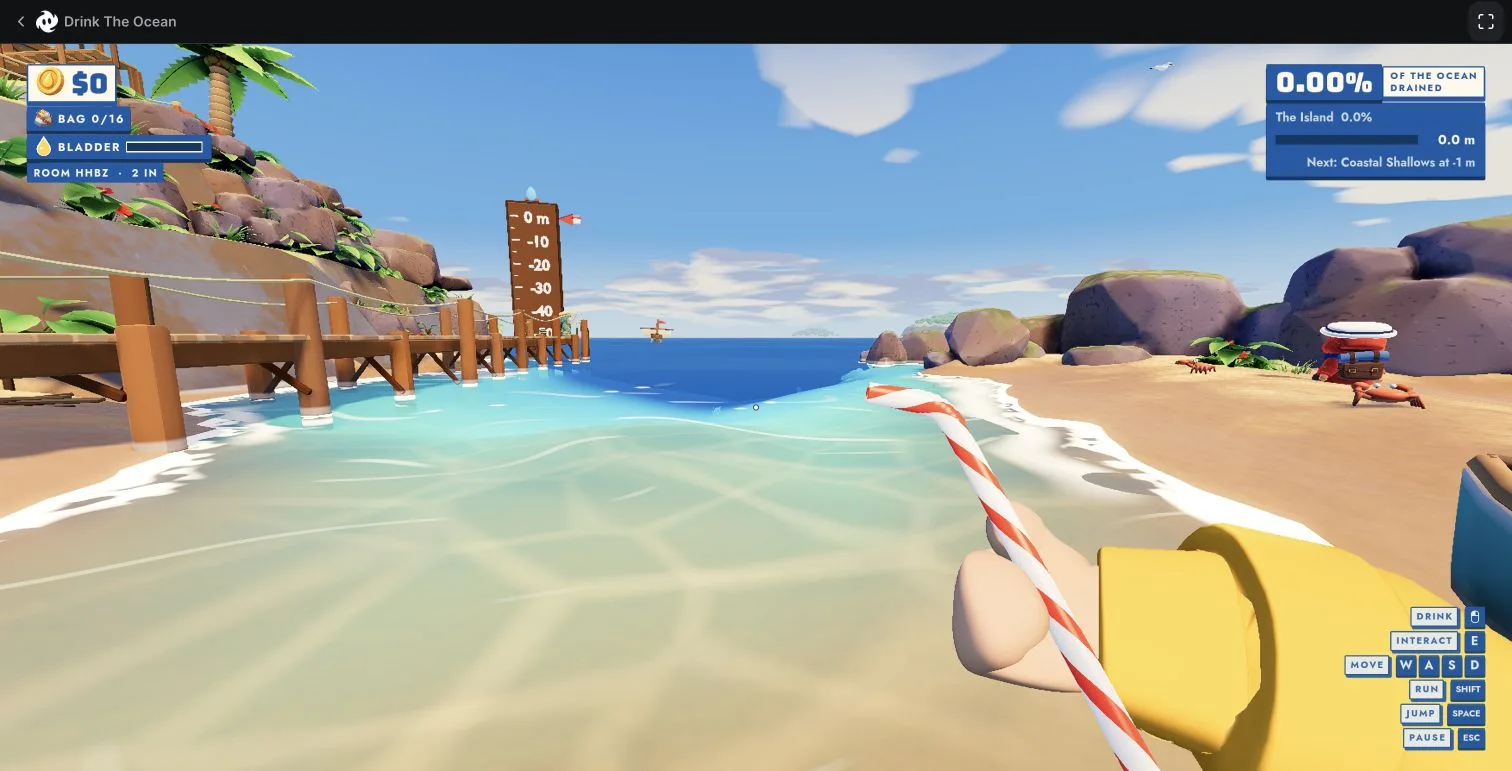
For that interface, use the starting guide and friend-joining walkthrough. Mana’s current listing specifies a desktop browser and keyboard/mouse input.
Playgama: the Pinidi Studio listing
The Playgama page identifies another Drink the Ocean by Pinidi Studio. Our November 13 comparison found the salt, press and shop system here. It is not evidence that those systems exist in Mana’s build.
If your screen has a PRESS or salt currency and a guide is instead telling you to sell seabed treasure to Mana’s merchant, you are probably crossing versions. Follow the listing’s own control instructions; do not transfer Mana’s room-code procedure to it.
Roblox: Drink The Ocean For Brainrots
Drink The Ocean For Brainrots is a Roblox experience by Unknowwn Studios. Its identity and Brainrots/base progression are separate from Mana’s island session. Use that exact title and creator when looking for its instructions.
A result advertising Roblox codes is not a source of Mana room invitations. We do not publish a Roblox promo-code list here, and the historical four-letter code in our screenshot is not a reward code for either game. Check Roblox itself for current availability.
Drink the Ocean on Steam: what can you actually play?
You do not need Steam to play the Mana version. Open the official browser game on a computer with a keyboard and mouse. Mana’s current listing says “Available now.” Follow the first-straw guide once you reach the island, or create a room before inviting a friend.
- Need a Steam client?
- No, for the Mana browser game covered here.
- Official Mana Steam date?
- Not verified. We do not have a confirmed store page or date to link.
- What about Steam saves and friends?
- Do not assume cross-platform saves or invites. Our tested route is Mana’s Host Game / Join Game menu.
Is Sip Fisher the same game?
Sip Fisher’s official Steam page names Syphon Software as developer. It is about draining a lake and selling fish. That store page does not establish a Steam release of Mana’s Drink the Ocean.
We have not confirmed a Steam store page or release date for the Mana game. A page using “Drink the Ocean Steam” in its title is not by itself a store announcement. Before buying or downloading, check the exact title, developer and official platform link.
“Can I play on mobile or PS5?” depends on which game
For Mana, the official answer currently points to desktop browser play with a keyboard and mouse. We have not verified a Mana mobile or console release. A different platform supporting phones does not establish mobile support for the Mana game.
For the other titles, use their current official listings rather than this site's Mana controls. We do not use a similarly named game to claim that your progress or multiplayer invitation will transfer.
Where to verify
The links above lead directly to each platform. Mana’s current listing and Steam’s Sip Fisher page were checked November 14, 2026. The Playgama and Roblox identity comparison comes from the November 13 research; availability can change. Our source and testing policy explains the limits.